Case study · Strata.ca Search Bar
Problem
The search bar was underutilize: no suggestions from an empty search to help guide users and it did not help inform users. It was simply a search, you either get a result or try again
Solution
Search bar revamped to show users results grouped into locations, buildings and listings, and suggestions tailored to new and returning users. Search bar now also shows followed listings. Search bar now also has been optimized to generate sign up leads.
Outcome
Shipped. Every user now gets a next step before typing, and new users are nudged to sign up and save a search, which turns them into a lead.
Turning a blank search bar into a guide.
After the map search redesign, I turned to the search bar because it gave no suggestions, and analytics revealed that the search bar is among one of the heavily used feature on the website. The old search bar either gave you a result or a try again message. From my competitive research, I saw an opportunity to optimize the search bar not only to generate sign up leads but improved the UI to offer more value.

01 — Context
The next weak spot after the map.
At Strata, a Toronto condo brokerage, the search page functioned as one of the main sources of leads.Saving a search requires an account, so every saved search is a lead for our agents.
In September and October 2023, we redesigned the map search page to bring Save Search out of hiding. With the page in better shape, the next weak spot was the search bar at the top of every page.
Read the map search case study →02 — The problem
A search bar that gave nothing back.

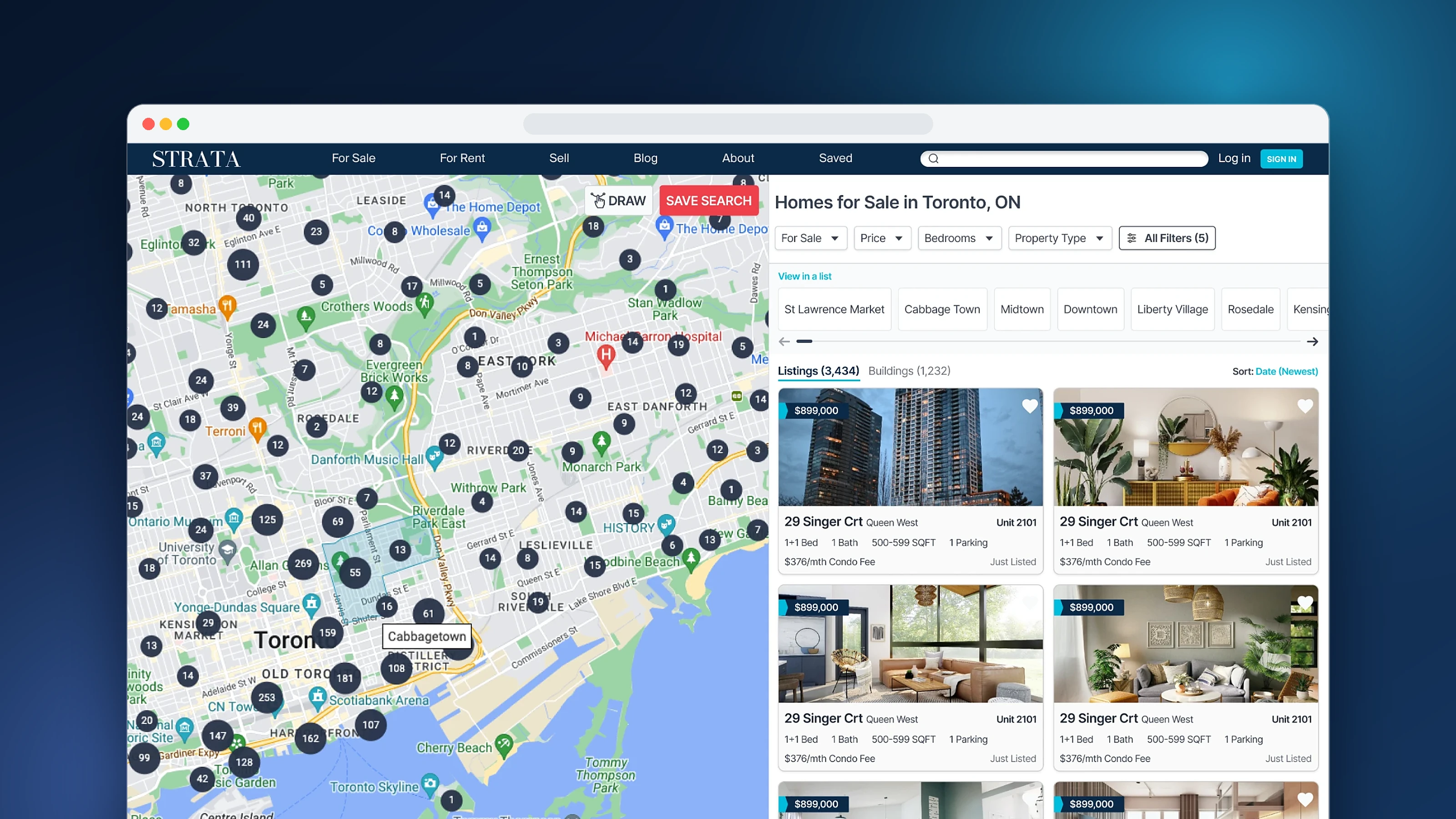
The old header, October 2023. The page shows homes in Toronto, but the search bar stays empty.
The search bar sat in the header of every page, but clicking it did nothing. It gave no suggestions, cleared after every search, and didn’t show which region you were viewing.
Issue 01
No suggestions
Clicking the search bar showed nothing. No search suggestions, no popular searches, and no shortcut back to saved searches.
Issue 02
General Search not available
Users were not able to just type 'Downtown Toronto' because the search bar only matched addresses.
Issue 03
No Search History
Without a search history, users could not go back to listings they recently viewed. This made their experience feel transient and that the website wasn't really there to help.
I looked at how other real estate sites, including Redfin, handled search. Most showed recent or popular searches as soon as you clicked, and several let you add more than one region as chips.

Strata’s old search bar (far left) next to other real estate sites, October 2023.
I put the search bar high on my list because it’s where every search starts and the CrazyEgg heatmap showed us that on every page the Search bar was being used regularly. So I asked, how can I leverage the search bar to help users achieve their goal, which is to find a potential new home.
As I conducted the audit, I asked, is there something at this point that would be helpful to my search journey? My objective was to help connect users to the right place as efficiently as possible because once they found a place they like, they would book a showing, which would be added into the lead pool as a hot lead for the agents.
03 — Goals
What success looked like.
“How can we optimize the Search Bar to help users on their property search journey?”
Goal 01
Add utility
Provide users with suggestions like popular searches and Recently viewed in addition to just search results
Goal 02
Pick up where you left off
Put saved searches and favourites one click away for returning users. This makes it easy for users to continue their search
Goal 03
A search bar worth clicking
Turn an empty field into a place that shows what users can search by.
04 — Key design decisions
Three changes to the search bar.
Navigate
Region chips
The search bar now shows the region you’re viewing as a chip, so you always know where you are, and your last search stays visible. You can add another region to widen your search. To keep it simple, the new region field only matches regions, and the neighbourhood picker hides once two or more regions are added. Once discussed with the developing team, we decided to leave this feature out of phase one due to the added complexity to the backend system.

Region chip states: the default Toronto chip, Add Another Region, typing a new region, and region-only results.
Find
Grouped results
Results split into locations, buildings and listings, each with its own icon. Most of our organic traffic came from people searching for addresses, so buildings and listings got their own groups. Listings show status, specs and price, so they are easy to tell apart.

Typing “Rich” returns locations, buildings and listings in separate groups.
Personalize
Suggestions for each user
Returning users see recent views, their saved searches and their favourites. They can also manage their search from the menu. New users see popular searches and a prompt to log in or sign up to save searches. Both get a next step before they type, and the sign-up prompt links the search bar back to Save Search.

Left: a returning user. Right: a new user, with a prompt to sign up.
05 — Iteration
From a first draft to a calmer panel.
I explored states for registered and new users, then refined them with the team in our review meetings. We brainstormed what the empty search bar should show. The next step was to update the search results to the new UI and test them on staging before release.
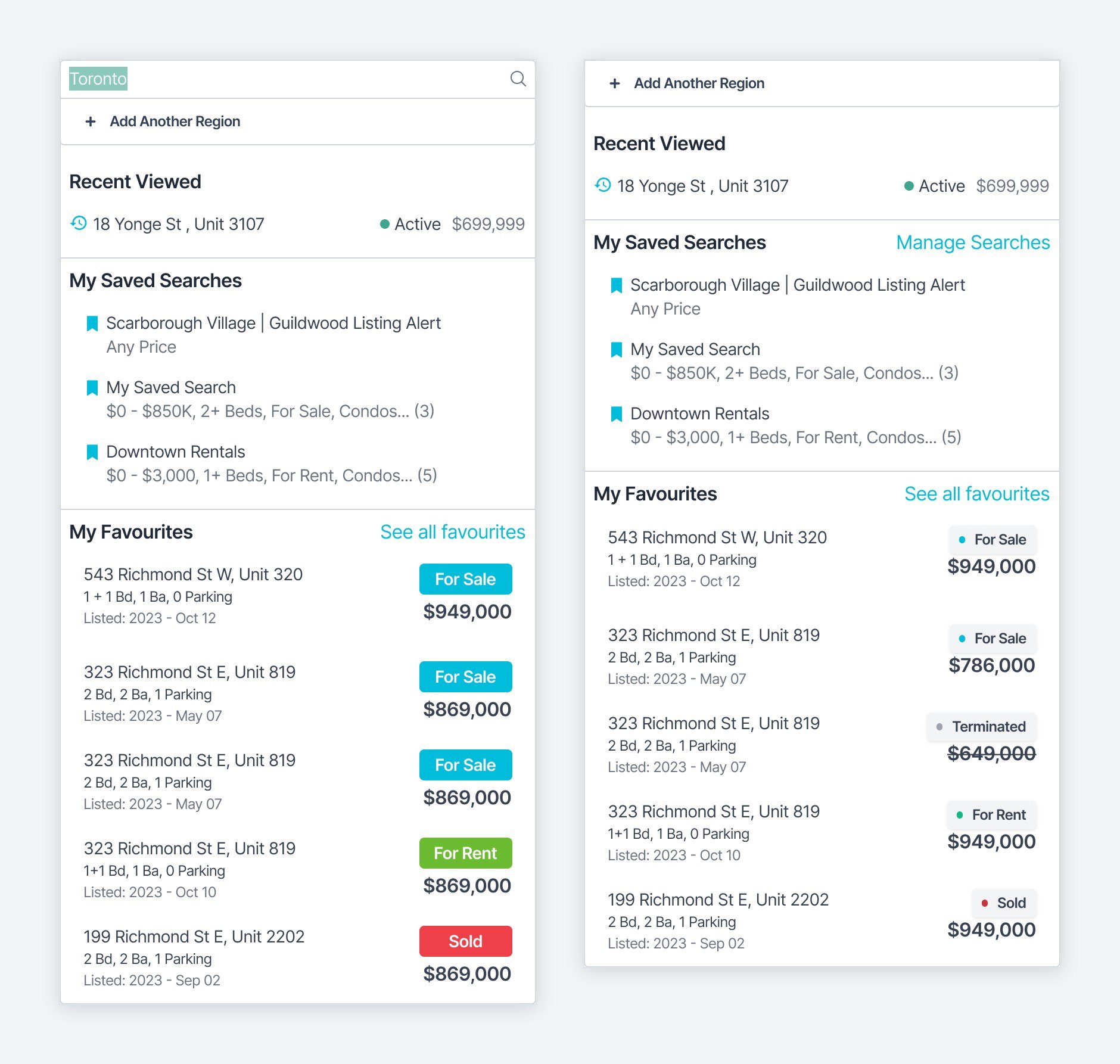
Version 1 (left) used solid colour tags. Version 2 (right) uses small dot labels and adds Manage Searches.
Visual
Quieter status labels
Solid colour tags made it quick to understand the listing status. Version 2 was simple but did not have enough contrast, thus just felt to text heavy.
Navigation
Shortcuts to your lists
Version 2 added Manage Searches and See all favourites, so returning users can jump straight to their lists.
Scope
Regions only
Adding several regions only matches regions and hides neighbourhoods. Mixing both was too complex to build well at the time.
06 — Outcome
The goal was the same: help people find their perfect home.
Momentum
No more empty state
As soon as you click into the search bar, you have options to help you get started or you can start searching
Recognition
Less to remember
Recent views, saved searches and popular searches appear on click, so people pick from a list instead of recalling what to type.
Findability
Results that are easy to scan
Grouping locations, buildings and listings makes it clear what each result is before you click.
Status: Shipped. Once the new search bar was tested on staging we prepared it for release.
07 — Reflection
What I’d take into the next project.
01
Use the empty state
A blank field is a chance to help. Showing options on click costs little and gives people a place to start.
02
Design for both users
Returning and new users need different help. Planning both states early kept the panel useful for each.
03
Scope to ship
Limiting multi-region search to regions kept the feature simple enough to build and easy to understand.