Case study · Strata.ca Map Search
Problem
The map search page had the potential to generate Strata consistent leads, but the Save Search was a pale, low-contrast button tucked in a corner.
Solution
I ran the company's first UX audit, made the case to pause new features, and redesigned the page: Save Search moved onto the map, the filters recieved changes and the page received a new layout to imrove its visibility.
Outcome
Shipped in October 2023, with Save Search now the clearest action on the page. There were no analytics to isolate conversion, so I proposed making them a priority for every change after.
Finding where UX was costing a brokerage leads.
As Strata’s first in-house designer, I ran the company’s first UX audit, identified high impact opportunities, and made the case to pause new features and fix the page that brought in most of our leads.
01 — Context
In real estate, leads are revenue.
I was Strata’s first in-house designer. Before me, nobody had audited the website or the product from a UX point of view, so there was no shared picture of what was working, what wasn’t, and what it was costing the business.
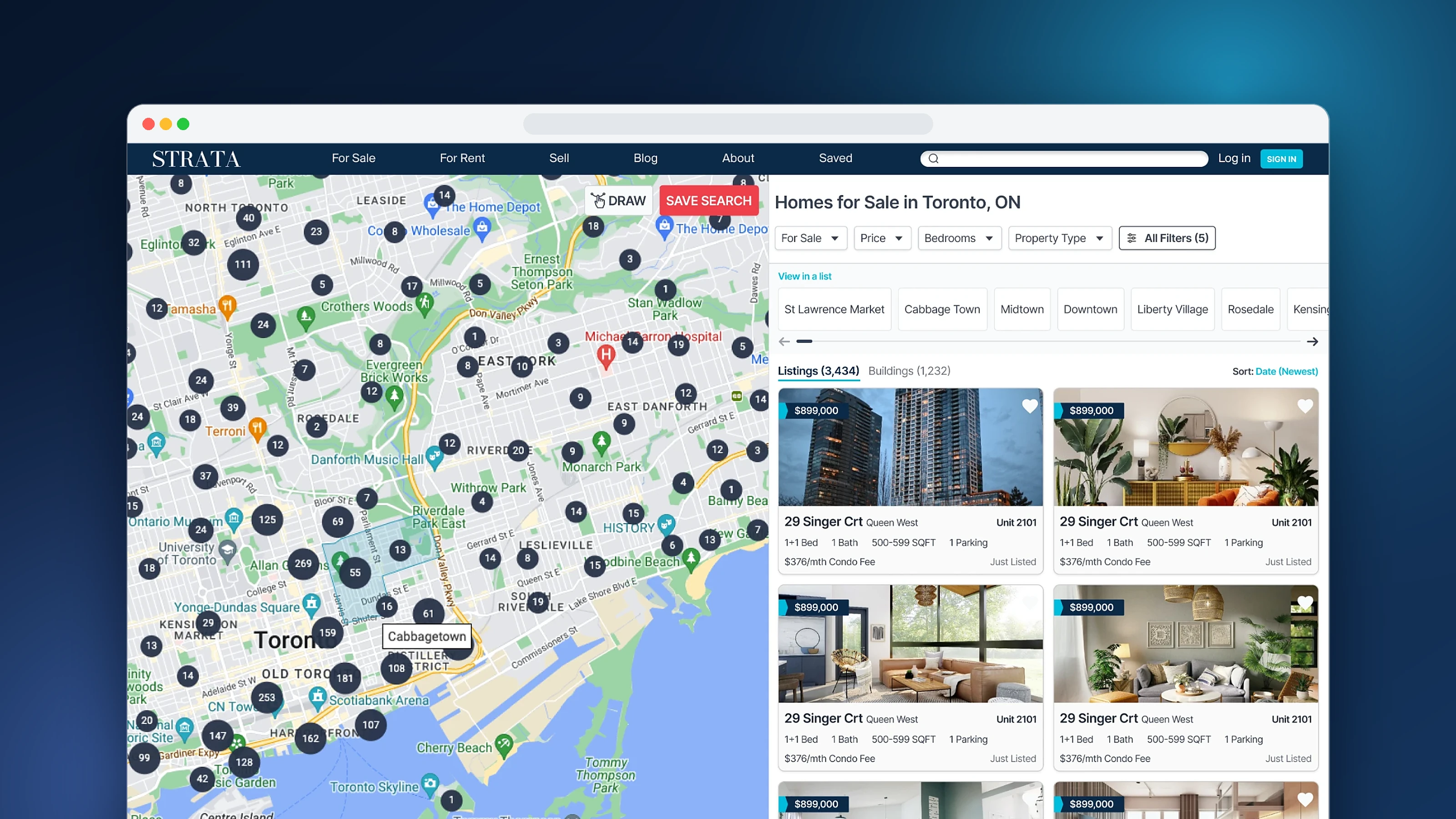
At Strata, a Toronto condo brokerage, the map search page brought in more leads than any other page on the site. The feature behind most of them was Save Search: users set their filters, save the search, and get an alert when a matching home comes on the market.
Saving a search requires an account, so every saved search is a lead for our agents. If people weren’t saving searches, the business wasn’t growing.
02 — The audit
Mapping the business before touching the UI.
Instead of starting with screens, I started with the business. I wanted to know which parts of the website and product actually moved revenue, so a small team could spend its time where it mattered most.
Step 01
Map the business
I mapped the 11 systems that keep the brokerage running, from lead generation and the CRM to marketing and agent support, and wrote down what each one is for and how we would measure it.
Step 02
Log what gets in the way
I went through the website and our internal tools and logged every UX issue and idea against the system it affected. By the Q4 planning meeting, the list had 24 items.
Step 03
Follow the revenue
Lead generation had the most items and the clearest link to revenue. Inside it, the search page stood out: it brought in most of our leads, but small issues made it harder to save a search.
From my audit notes in Notion: 24 UX issues and ideas logged across the business, May to September 2023.
03 — What the audit found
Can you find the Save Search button?
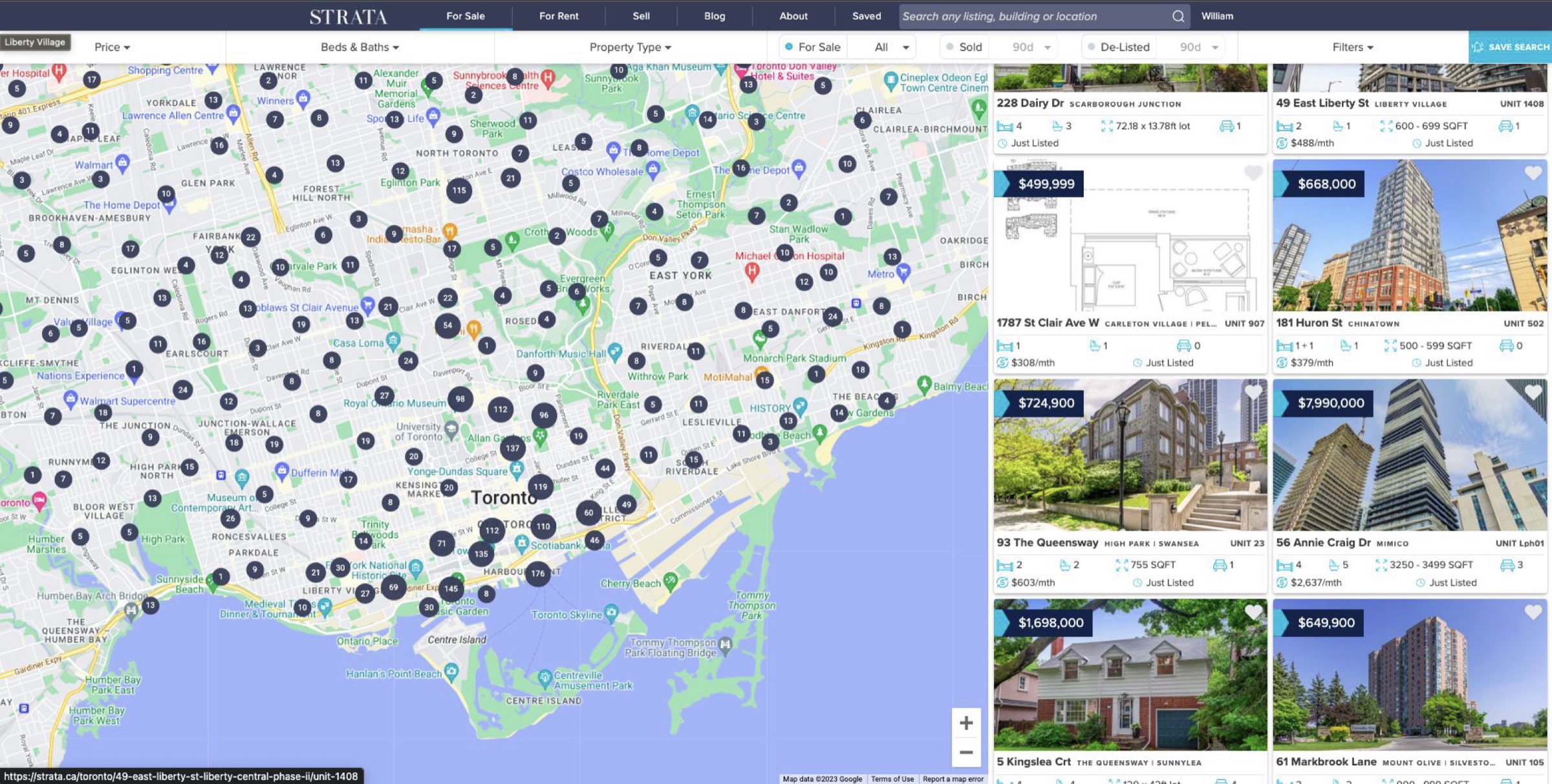
The map search page before the redesign, October 2023.
On the search page, the biggest issue was Save Search, the feature behind most of our leads. It sat in the top-right corner, in a pale colour with almost no contrast. The feature the business depended on was the hardest thing on the page to find, and it wasn’t the only issue.
Issue 01
A hidden call to action
Save Search was pushed to the far right with low contrast, so most users never noticed it.
Issue 02
Scattered information
Filters ran the full width of the top while results sat on the right, which split attention and left no clear main action.
Issue 03
Cramped filters
Dropdowns were narrow, filters far apart and had no hierarchy. The page felt dated and hard to use. Based on feedback from agents.
Hover or tap the numbers to see what was wrong.
Hidden filters
Filters are pushed aside and too hidden. The full-width layout also adds cognitive load for users.
Save Search is hard to see
Save Search, the only call-to-action button, isn’t just hidden. It’s small, and its colour doesn’t have enough contrast to be noticed.
The map takes over
Making the map the main focus distracts users from their goal and makes other features harder to find.
- Hidden filters. Filters are pushed aside and too hidden. The full-width layout also adds cognitive load for users.
- Save Search is hard to see. The only call-to-action button is hidden, small, and low in contrast.
- The map takes over. Making the map the main focus distracts users from their goal and makes other features harder to find.
04 — The case for focus
Fewer new features, stronger fundamentals.
Heading into Q4, we already had a pipeline of new features lined up. Using the audit, I made the case to our managing director to pause new feature work for the rest of the year and fix the search page first, because that’s where the majority of our leads came from.
My proposal: improve the search page and the Saved Search flow first, and set up proper analytics so future decisions would be based on our own data instead of competitors’.
“We can’t keep playing catch-up with competitors. We’re a small team. We need to understand our users.”
05 — Goals
What success looked like.
Goal 01
Make Save Search obvious
Put it where users are when their search feels right.
Goal 02
Make filtering effortless
Filters that are quick to scan, easy to set and easy to undo.
Goal 03
Clear hierarchy
Listings and the main action come first. Everything else supports them.
06 — Key design decisions
Three decisions that put Save Search first.
Decision 01
Put Save Search where the intent is
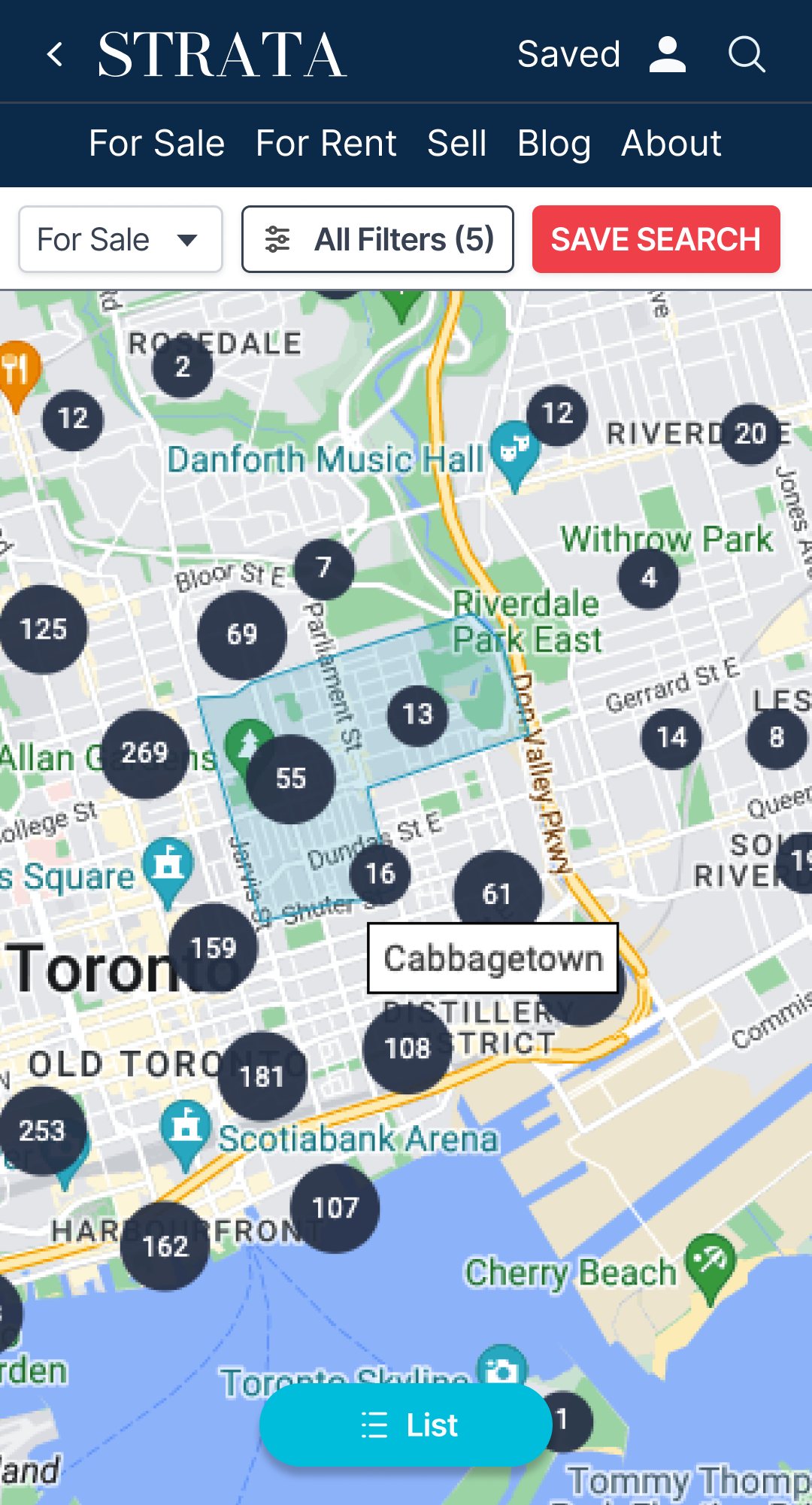
Users decide a search is worth saving while they’re looking at the map, so I moved Save Search onto the map, next to the draw-boundary tool. It started as a bold red. After the first demo we softened it to a coral that stands out without shouting. On mobile it stays in the filter bar, where thumbs already go.
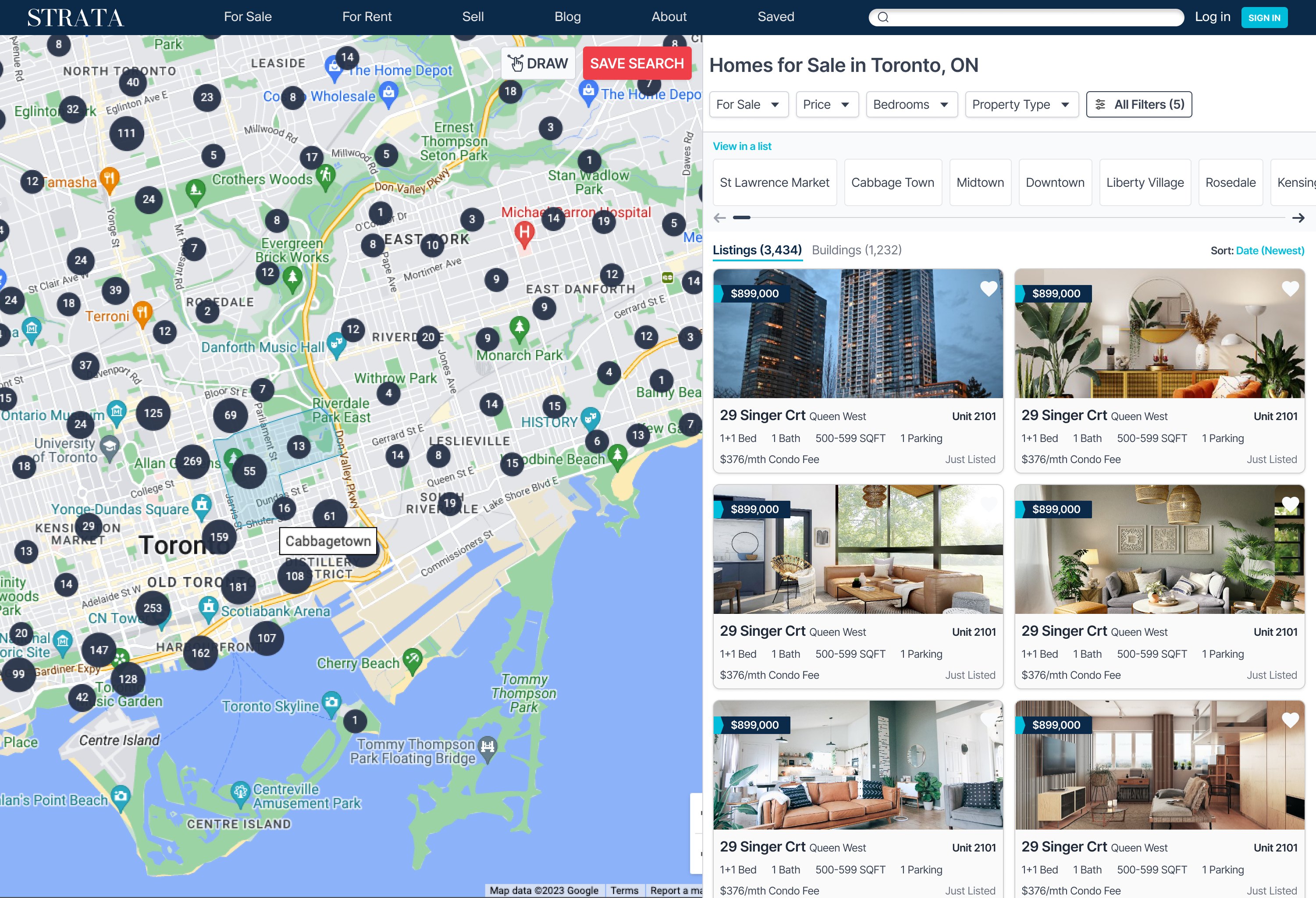
The redesigned search page: Save Search now sits on the map, next to Draw.
Decision 02
Make the filters easy to scan
Filters moved below the header and stay visible as you scroll. The property type list was cut to the six most-used types plus “All Properties”. Price became a slider. Beds and baths became tappable boxes, where choosing 2 also selects everything above it, which matches how people search (“2 or more”). Each filter got its own reset button.
Decision 03
Rethink “All Filters”
The old “More Filters” dropdown was a narrow column of pill buttons, with no grouping and no hint of which filters applied to which homes. I replaced it with a panel that slides in from the right, organised into clear sections, with condo-only and house-only filters marked and a live listing count on the main button. Try both below.
07 — Outcome
A clearer path to Save Search.
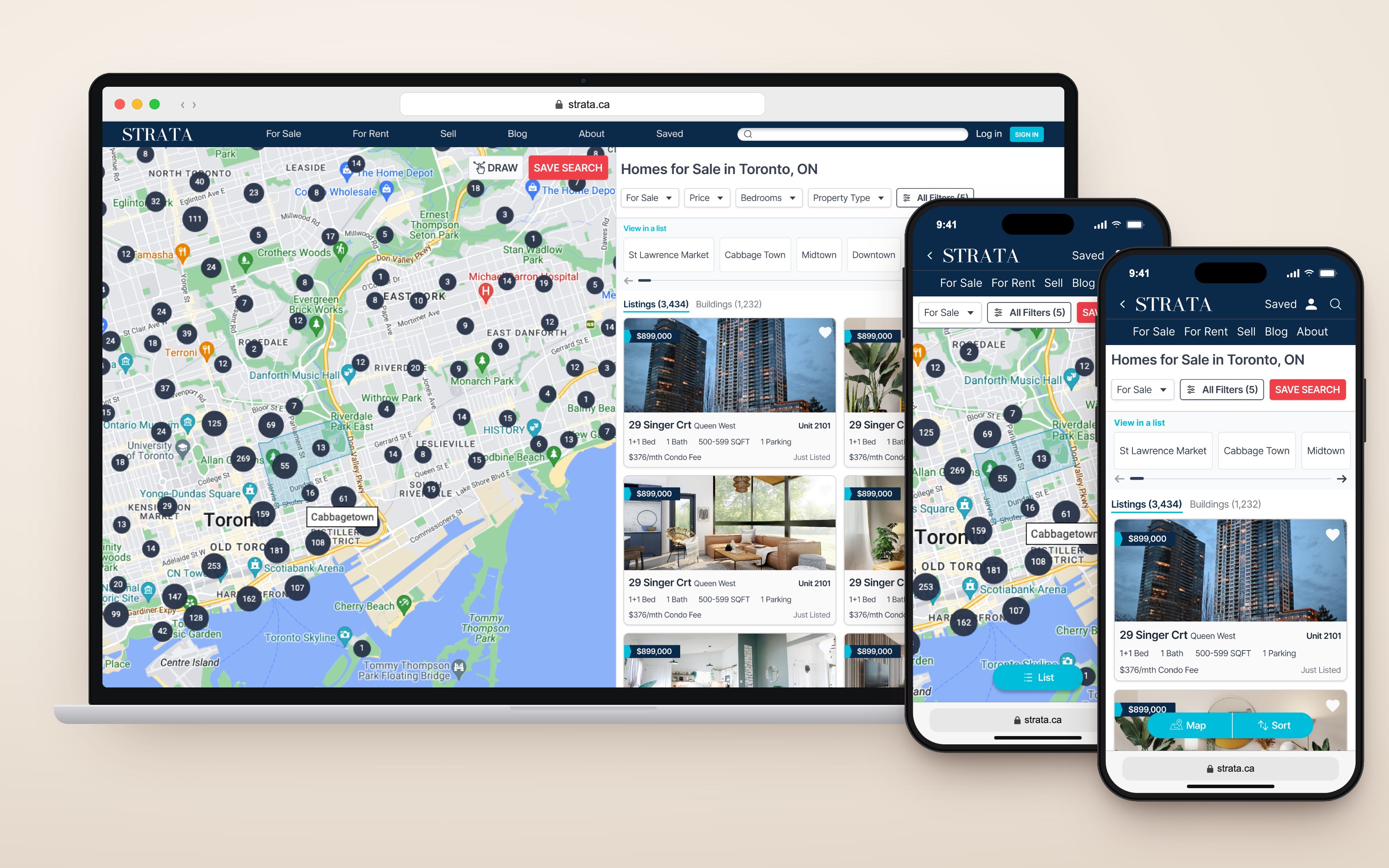
The shipped search page on desktop and mobile.
Mobile
The same filters, in a bottom sheet
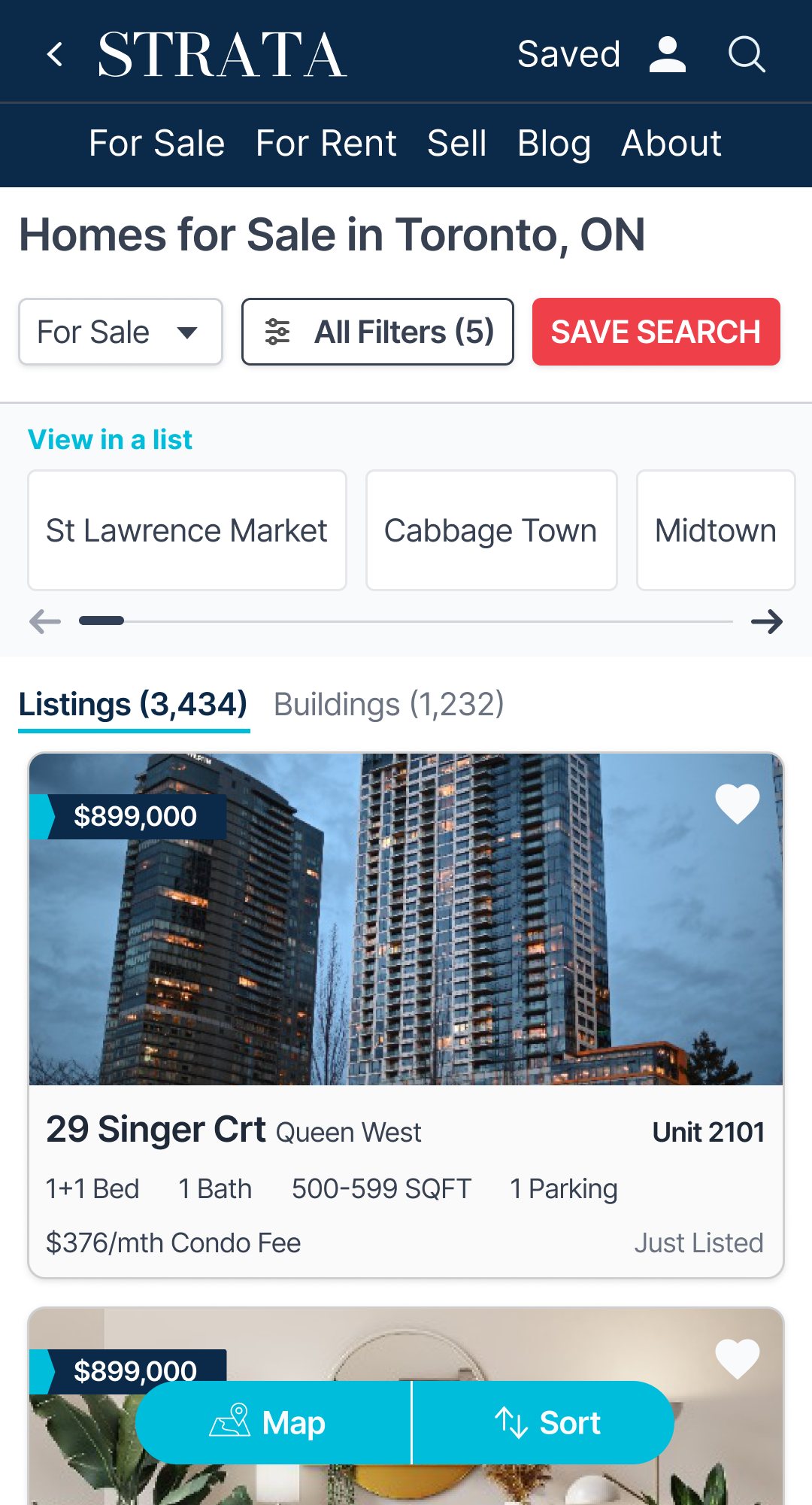
On mobile, All Filters slides up from the bottom with the same sections as desktop, so the panel only has to be learned once. A floating button switches between the map and the list.
Tap All Filters, or switch Map / List
Visibility
Save Search is easy to find
It moved from a pale button in the corner to a coral button on the map, right where users decide a search is worth saving.
Hierarchy
Clear CTA
Colour and placement now work together, so the layout points to one suggested action on the page: saving your search.
Efficiency
Filters that are quick to set
Filters stay in view, beds and baths take one tap, and every filter can be reset on its own.
Shipped in mid-October 2023. We didn’t have the analytics in place to isolate the change in conversion, so the impact here is measured in usability rather than numbers. That gap is why I proposed making analytics a priority across the whole website, so we’d always have a heartbeat on how people use it and could measure every change that followed. The redesign also became the foundation for the listing page and building page work.
08 — Reflection
What I’d take into the next project.
01
Measure first
Without strong baseline analytics, impact was harder to prove. That’s why I pushed for analytics in the Q4 plan.
02
Clarity over features
If users are not using the original feature, you don’t build more features to get them to use the original feature.
03
Listen to the front line
Agents talk to buyers every day. I proposed using our agent Slack channel for ongoing feedback.